An AI rewrite can make a vague bullet point clearer in seconds. It can also quietly turn “helped with” into “managed”, or add a result nobody measured. This tutorial walks through Folio's Improve bullet points with AI button using three fictional entries: a weekend retail job, a teaching placement, and a student placement project. For each one, you will see what to keep, what to fix, and what to delete before you apply the suggestion.
The short answer
Write the real facts into the description first: what you did, for whom, how often, with which tools, and any result you can prove. Then ask for a rewrite, compare every suggested line with those facts, and delete anything the AI added or upgraded. In Folio, only that entry's job title and description are sent, and nothing in your CV changes until you choose Use these points.
See the worked exampleWhat the AI button sends, and what it is told to do
In the Folio editor, every Work experience entry has an Improve bullet points with AI button under its description. It becomes available once the description has at least 30 characters. When you select it, the entry's job title and description go through Folio's server to OpenAI. Your name, contact details, photo, company name, dates, other entries, and uploaded files are not sent. Anything you typed inside the description is included, so take out details you would not want to share. Folio's server does not save or log the text; the privacy page explains what OpenAI may retain.
The model is instructed to keep every fact exactly as supplied, never to invent achievements, figures, responsibilities, tools, or skills, to return the same number of lines or fewer, and to start each line with an action word. Instructions reduce invented content, but they do not remove the need to check. NIST's generative AI risk profile lists confidently incorrect output as a known risk, which is why the suggestion arrives in an editable box rather than replacing your text.
Sources: NIST: Generative Artificial Intelligence Profile, AI 600-1
Before you press the button, write the facts down
The AI can only rearrange what you give it. A rough description that contains real details produces a better suggestion than a polished one that contains none. Replace a vague first draft with one line per task, using the checklist below. Keep it nearby: it is what you will check the suggestion against.
MIT's careers guidance suggests using AI to analyse weak bullets and wording gaps, while checking that edits preserve your experience and voice. Harvard's bullet point template is a useful reminder of the parts a strong line combines: an action, the task, and the context or result.
- What you did, with a verb you could defend at interview.
- Who it was for, or where it happened.
- How often or how many: shifts per week, pupils in a group, items per delivery.
- The tools, systems, or procedures you used.
- A result only if someone measured it, and only if it was yours.
Sources: MIT CAPD: Using AI for your resume and CV; Harvard MCS: Bullet point resume template
Example 1: a weekend retail job
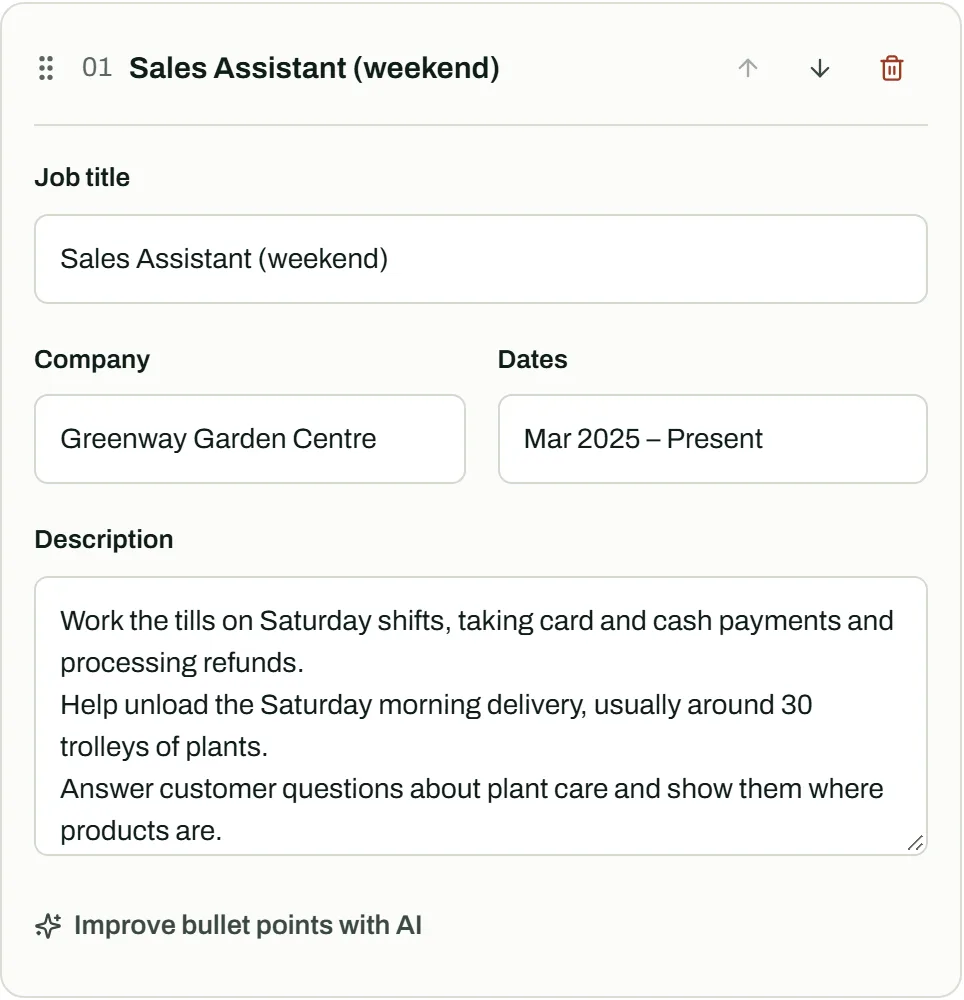
Sam, a fictional sixth-form student, works Saturdays at a garden centre. The first draft is three vague phrases. Sam rewrites it with the real details, then asks for a suggestion. The suggestions in these examples are illustrative, written for this guide to show the problems worth checking for; real suggestions vary, and Folio's instructions tell the model not to add facts, so you may see fewer problems. The check is the same either way.
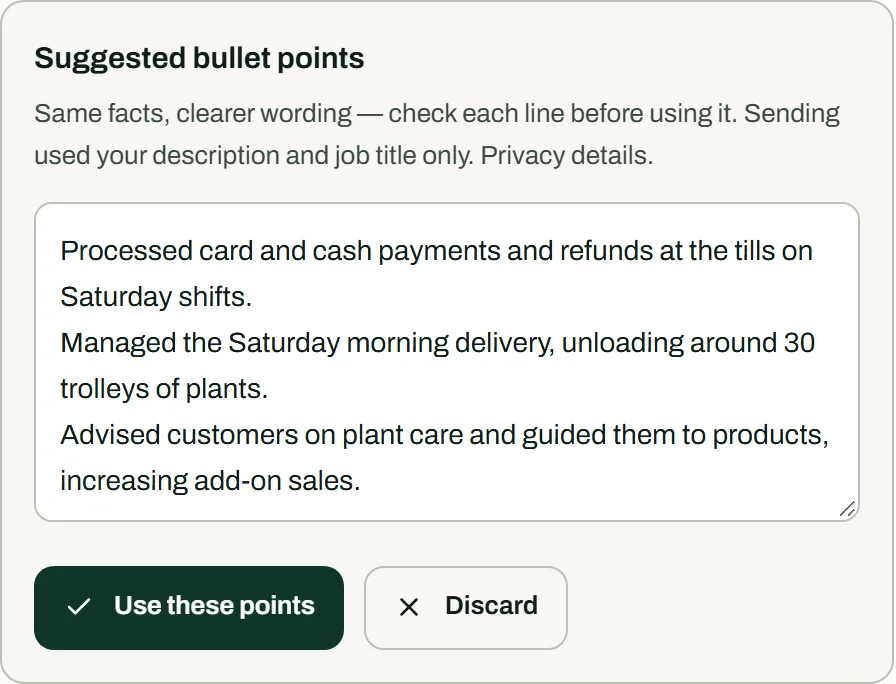
Two lines in the suggestion go beyond the facts. Helping to unload a delivery became managing it, and an increase in add-on sales appeared from nowhere. The suggestion also switched to the past tense, although Sam still works there.
| Stage | Text |
|---|---|
| First draft | Worked on the tills. Helped with deliveries. Answered customer questions. |
| Facts supplied to the AI | Work the tills on Saturday shifts, taking card and cash payments and processing refunds.Help unload the Saturday morning delivery, usually around 30 trolleys of plants.Answer customer questions about plant care and show them where products are. |
| AI suggestion | Processed card and cash payments and refunds at the tills on Saturday shifts.Managed the Saturday morning delivery, unloading around 30 trolleys of plants.Advised customers on plant care and guided them to products, increasing add-on sales. |
| Remove or fix | “Managed” claims responsibility for the delivery; Sam helps with it.“Increasing add-on sales” is a result nobody measured.Past tense describes a job Sam has left; switch to the present tense. |
| Final bullet points | Process card and cash payments and refunds at the tills on Saturday shifts.Help unload the Saturday morning delivery of around 30 plant trolleys.Advise customers on plant care and guide them to the products they need. |
Example 2: a teaching placement
Priya, a fictional PGCE trainee, is writing up a second school placement for an early career teacher application. Placements belong in Work experience, so the AI button is available. The facts include the timetable share, because that tells a head teacher how much responsibility Priya actually took.
The suggestion keeps most facts but adds an outcome, improved reading ages, that Priya never measured. It also turns supervising a trip into organising one. If a school has assessment data showing progress, you could describe it with permission and without identifying any pupil; without that evidence, describe the work itself.
| Stage | Text |
|---|---|
| First draft | Taught Year 4. Planned lessons with my mentor. Did a reading group. Went on the school trip. |
| Facts supplied to the AI | Taught maths and English to a Year 4 class on my second PGCE placement (8 weeks), building up to 60% of the timetable.Co-planned lessons with my class mentor each week.Ran a reading fluency group for five pupils three mornings a week.One of four adults supervising a class trip to the city museum. |
| AI suggestion | Taught maths and English to a Year 4 class over an eight-week PGCE placement, building up to 60% of the timetable.Co-planned weekly lessons with the class mentor.Led a reading fluency intervention for five pupils three mornings a week, improving their reading ages.Helped organise and supervise a class trip to the city museum. |
| Remove or fix | “Improving their reading ages” is an outcome Priya did not measure.“Helped organise” adds planning work Priya did not do; the facts say supervised. |
| Final bullet points | Taught maths and English to a Year 4 class over an eight-week PGCE placement, building up to 60% of the timetable.Co-planned weekly lessons with my class mentor.Ran a reading fluency group for five pupils three mornings a week.Supervised pupils as one of four adults on a class trip to the city museum. |
Example 3: a student placement project
Alex, a fictional computing student, built a small Python tool during a ten-week summer placement with another placement student. Shared work is where AI rewrites most often go wrong: a tidy sentence about a joint project can quietly credit one person with everything.
The suggestion gives Alex the email summary that the other student built, drops the fact that the script was a joint project, and adds a time saving nobody recorded. The final version keeps Alex's own part clear and still says what changed for the team.
The AI button appears on Work experience entries only. A placement belongs there. A class or personal project belongs under Projects, where you can build the same fact-based lines with the bullet point builder and check them the same way.
| Stage | Text |
|---|---|
| First draft | Did a summer placement in the operations team. Worked on a Python project. Learned a lot about data. |
| Facts supplied to the AI | Wrote a Python script with one other placement student that checks the weekly stock spreadsheet for missing product codes.I wrote the validation checks and the setup guide; the other student built the email summary.The team now runs the script every Monday instead of checking the spreadsheet by hand. |
| AI suggestion | Developed a Python automation tool that validates the weekly stock spreadsheet for missing product codes, saving hours of manual work.Wrote the validation logic and documentation, and built automated email summaries.Replaced manual weekly checks with an automated process adopted by the team. |
| Remove or fix | “Saving hours of manual work”: nobody measured the time.“Built automated email summaries”: the other student built them.“Developed a … tool” on its own hides that it was a joint project. |
| Final bullet points | Wrote the validation checks for a Python script, built with another placement student, that flags missing product codes in the weekly stock spreadsheet.Wrote the setup guide for the operations team.The team now runs the script every Monday in place of a manual spreadsheet check. |
Review the suggestion line by line
The suggestion appears below your description in an editable box. Your original text stays exactly as it was until you choose Use these points, and Discard removes the suggestion without changing anything. If you edit the description while a suggestion is open, Folio will not apply the old suggestion; ask again for one that matches your latest text.
Read each suggested line against your facts and look for the same four problems the examples show. Fix them inside the box before applying, or discard the suggestion and edit by hand. For choosing accurate verbs and tenses without AI, see resume action verbs and bullet points.
- Upgraded responsibility: helped becomes managed, supported becomes led, supervised becomes organised.
- Unmeasured results: improved, increased, or saved, with no figure you could explain.
- Merged credit: work shared with a team or another student now reads as yours alone.
- Lost context: a number, frequency, or setting from your facts has disappeared.
Free limits, privacy, and when to skip AI
AI bullet improvement is free within a daily allowance: up to 20 requests per visitor per day, and no more than five a minute. A site-wide daily cap can pause AI help for everyone until the next day. Manual editing, downloads, and the rest of the editor keep working without AI.
Leave out names of pupils, patients, customers, or clients, and anything your employer treats as confidential, before sending a description. Some application forms ask whether you used AI or require the content to be your own work; follow those instructions. If an entry is already clear and accurate, it does not need a rewrite.
Before you choose Use these points
- Every line matches a fact you supplied.
- No verb claims more responsibility than you had.
- No result appears that you did not measure or cannot explain.
- Work you shared with others still says so.
- The tense matches whether you still do the job.
- No pupil, customer, client, or colleague can be identified.
Frequently asked questions
Does the AI see my whole CV?
No. Improve bullet points with AI sends only the job title and description of the entry you choose. The AI CV job match tool sends more, and the privacy page lists exactly what each AI feature sends.
What if the suggestion is worse than my original?
Choose Discard. Your original description stays exactly as it was, and you can keep editing it by hand or ask for another suggestion later.
Is it acceptable to use AI for CV bullet points?
Many employers accept help with wording, but some applications ask you to confirm the content is your own work or restrict AI use. Follow the employer's instructions, and only submit lines you can explain in an interview.
Sources and further reading
Sources checked on . Examples are fictional; practical suggestions are Folio's own application of the guidance.