Many employers use an applicant tracking system (ATS) to collect and organise applications. You do not need tricks to get through one. A clearly structured CV, standard headings, real text, and honest use of the job’s language do most of the work, and they help the human reader too.
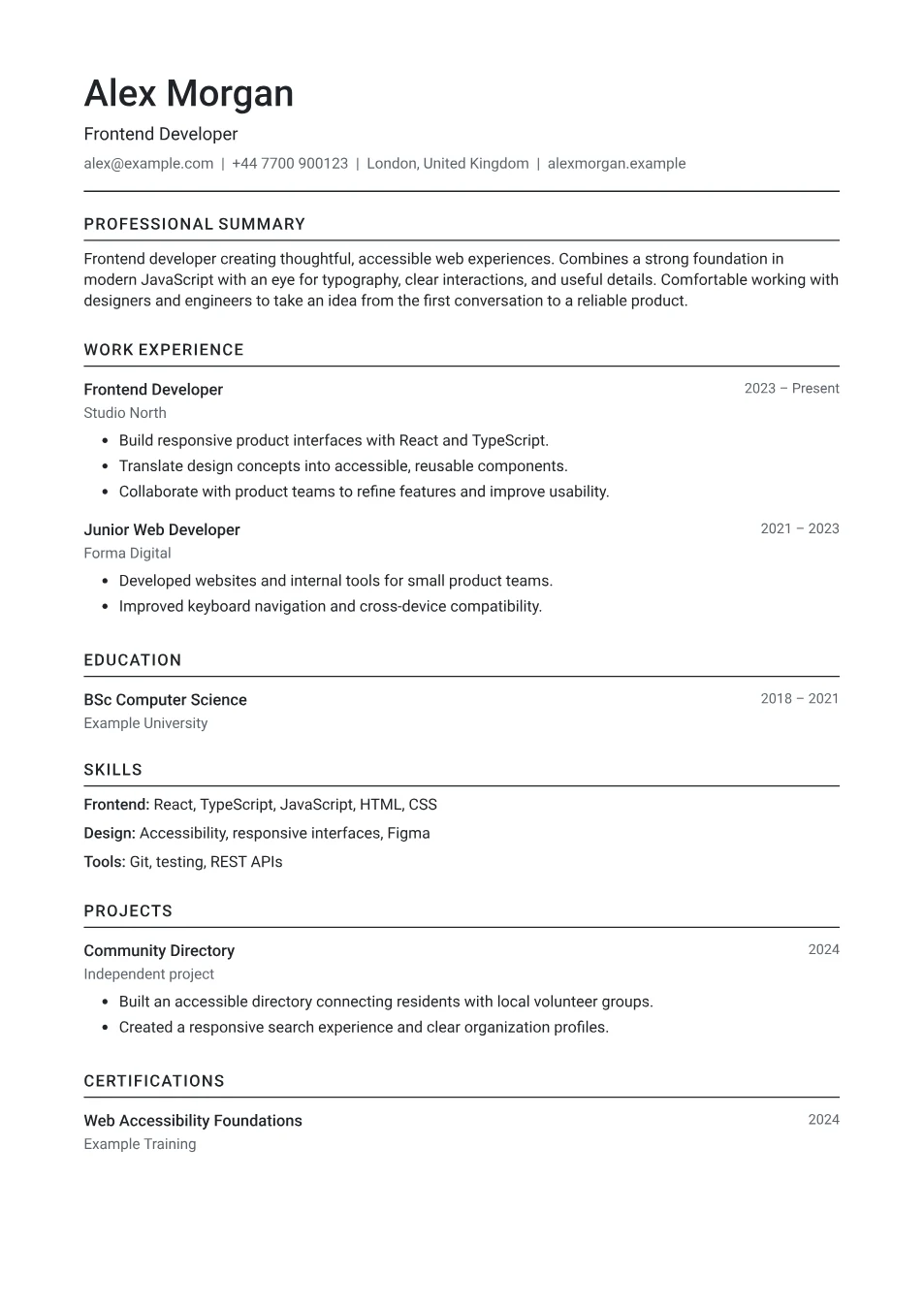
What an applicant tracking system actually does
An ATS is software that stores applications, moves candidates through hiring stages, and lets recruiters search and filter them. Many systems also parse your CV, copying details such as your name, job titles, and dates into fields, and some let recruiters search applications for skills or compare them with the job’s requirements.
Each employer configures its system differently, and in most cases people still make the decisions. The aim is not to “beat” software, but to make sure nothing gets lost when your CV is read by it, and that a recruiter searching for the right skills can find you.
Keep the format simple and readable
Parsers read text in order. A single-column layout with standard headings is the safest choice when you know an ATS is involved. Two-column designs often parse correctly, but text in separate boxes or side panels is more likely to be read out of order.
Folio’s ATS-friendly templates, including Clarity and Linear, follow these rules by design.
- Use standard section headings: Profile, Work experience, Education, Skills.
- Keep your name and contact details in the body of the page, not only in a header or footer.
- Avoid putting important text in images, charts, or icons.
- Write dates in a consistent format next to each role.
- Choose a common, readable typeface and avoid laying out text in tables.
Send the file type the employer asks for
Follow the application instructions first. If an employer asks for a Word document, send one. Otherwise, a PDF with selectable text is widely accepted and keeps your layout intact. Every Folio PDF contains real text, not a picture of text.
Test your file: open the PDF, select all the text, and paste it into a plain text editor. If the words appear in a sensible order, a parser can read them too. Folio’s Review CV tab also shows your CV as plain text.
Use the job’s keywords honestly
Recruiters often search for specific skills, tools, and qualifications. Read the job description, note the terms that describe what you can genuinely do, and use the same wording in your CV, ideally with evidence beside it. If the advert says “stakeholder management”, a line about how you managed stakeholders is stronger than a list of synonyms.
Spell out acronyms once, for example “Search engine optimisation (SEO)”, so both versions appear. Write the names of tools exactly: JavaScript, not Javascript.
The free resume keyword checker compares your CV with a job description and lists matching and missing terms, entirely in your browser.
What to avoid
Some advice online promises an “ATS score” or claims that most CVs are rejected by software. Treat such claims with caution: systems and employer settings differ, and no outside tool can see exactly how an employer’s system will treat your application.
- Hidden or white text packed with keywords. Recruiters can see the parsed text, and it looks dishonest.
- Listing skills you could not discuss in an interview.
- Unusual section names, such as “My journey” instead of Work experience.
- Text inside images, including a logo-style name.
- Abbreviations without an explanation.
A quick ATS-friendly checklist
Then read it as a person would. A CV that software can parse easily should also be easy for a recruiter to scan quickly.
- A single column with standard headings.
- Contact details in the body of the document.
- Dates and job titles as plain text.
- Real, selectable text in the PDF.
- Key terms from the advert, used where you can back them up.
- The file type the employer requested.
Frequently asked questions
What is an ATS-friendly CV?
A CV that applicant tracking systems can read accurately: real text, a clear reading order, standard headings, and consistent dates. The same qualities make it easier for people to read.
Are PDFs ATS-friendly?
A PDF with selectable text is accepted by most systems. If the employer asks for a Word document, send one. Avoid scanned PDFs, which contain a picture of the page rather than text.
Can a free tool tell me my ATS score?
Not reliably. Each employer’s system and settings are different, and outside tools cannot see them. A keyword comparison shows how closely your wording matches the advert, which is useful, but it is not a prediction.
Do two-column templates work with an ATS?
Often they do, but a single-column layout is the safest choice when you know your CV will be parsed. If you prefer two columns, copy the text from your PDF to check that it reads in order.